

Emergency communication management
In an earthquake, how many minutes would it take to reach all of your staff?
Most organisations learn the answer for the first time during a real crisis. Dr. Call is a multi-channel emergency communication platform built so that an organisation can reach its own employees in an emergency, learn their status and bring the crisis team together within minutes.
WhatsApp, SMS and voice calls go out at the same time; who was reached, who answered and whose status is still unknown is tracked on one screen. The platform serves a closed user group: the organisation’s staff, its crisis team, its shift supervisors. It is not a public warning system. Its approach is informational: the system alerts the operator, the operator decides. That framework took shape in tests and presentations with organisations in banking and energy since 2023.
Channels
SMS (444 number or short code)
Voice call with keypress reply
Conference bridge
Mobile app (iOS, Android)
Microsoft Teams
Who it is for
Teams responsible for the first five minutes of a crisis
The tools at hand (phone trees, mass email, operator calls) slow down in a crisis and never show who could not be reached. In a hospital’s night-time drill, staff tried to reach 132 people through a manual phone tree: after 45 minutes only 41% had been reached (McGill University Health Centre, Prehospital and Disaster Medicine, 2018).
Banking and finance crisis teams
Business continuity plans require the crisis team to be in conference within minutes. The system calls the team, bridges those who answer and shows who is missing.
Factories and energy sites
Shift supervisors and field staff are grouped by location. A fire-panel trigger or earthquake data reaches the staff of the affected site at the same time.
OHS and business continuity units
The communication leg of the emergency plan is tested in drills and the result report comes from the system. Who was reached, and when, is documented with timestamps.
Three core jobs
Reach, learn the status, bring together
Dr. Call does three deliberately narrow jobs. Scenarios define how people are reached; rooms define where they gather.
Notify and ask for status
The system reaches each person by WhatsApp, SMS and voice call and asks whether they are safe or need help. Replies are collected by keypress or message and shown per person on screen.
Outbound conference assembly
The crisis team is called one by one and everyone who answers is bridged automatically into the same conference room. The war room forms without anyone dialling a number.
Inbound conference access
An authorised person calls the system’s fixed number, is recognised by caller ID or enters a PIN, and joins their room. Standing rooms have their own number and PIN.
From alarm to report
Five stages, no operator intervention required
The whole chain runs within minutes. False alarms are part of the design: after an automatic trigger the operator can be given a short cancellation window; when an emergency stop is issued, a correction message goes out to staff.
- TriggerEarthquake data from AFAD or USGS above the magnitude threshold the organisation set, a dry-contact signal from the building’s fire panel, or an operator starting the scenario by hand.
- Target groupWho gets called comes from the groups tied to the scenario: location, unit, role. The staff list is fed from Active Directory, a web service or an Excel template.
- Channels in parallelWhatsApp, SMS and voice go out together. Each channel backs up the others: no internet means SMS and calls still get through; a busy line means the message still lands.
- Real-time trackingPer person, the states waiting, contacting, contacted, responded, failed and in conference update live. Safe, needs help and unreachable counts sit on one screen.
- Escalation and reportStaff who do not respond are escalated to their manager. Every message, reply and escalation step is time-stamped; drill and audit reports come out of the operation log.
Screens
The screens in front of the crisis desk
Screens are taken from the demo environment; names and numbers are sample data.
Operation tracking
Who is safe, who is ready for duty, who needs help
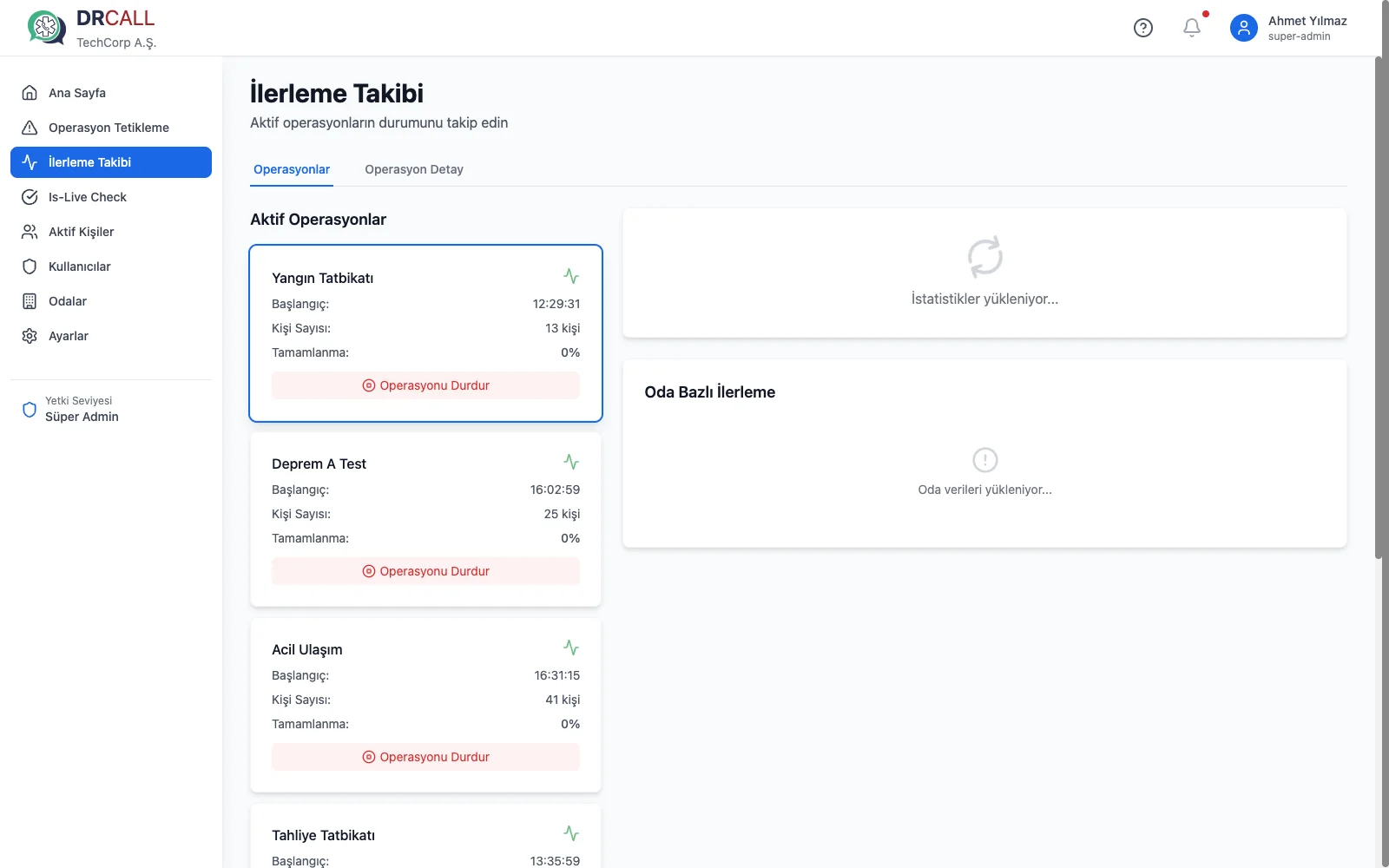
In crisis management the real question is not “did the message go out”. The operations screen shows each person’s contact state and reply; safe, needs-help and unreachable counts are totalled live. Who joined the conference and who dropped shows in the same place.
- Filter and search: the status of one unit or location on its own
- Person history: each person’s contacts listed channel by channel
Scenario trigger
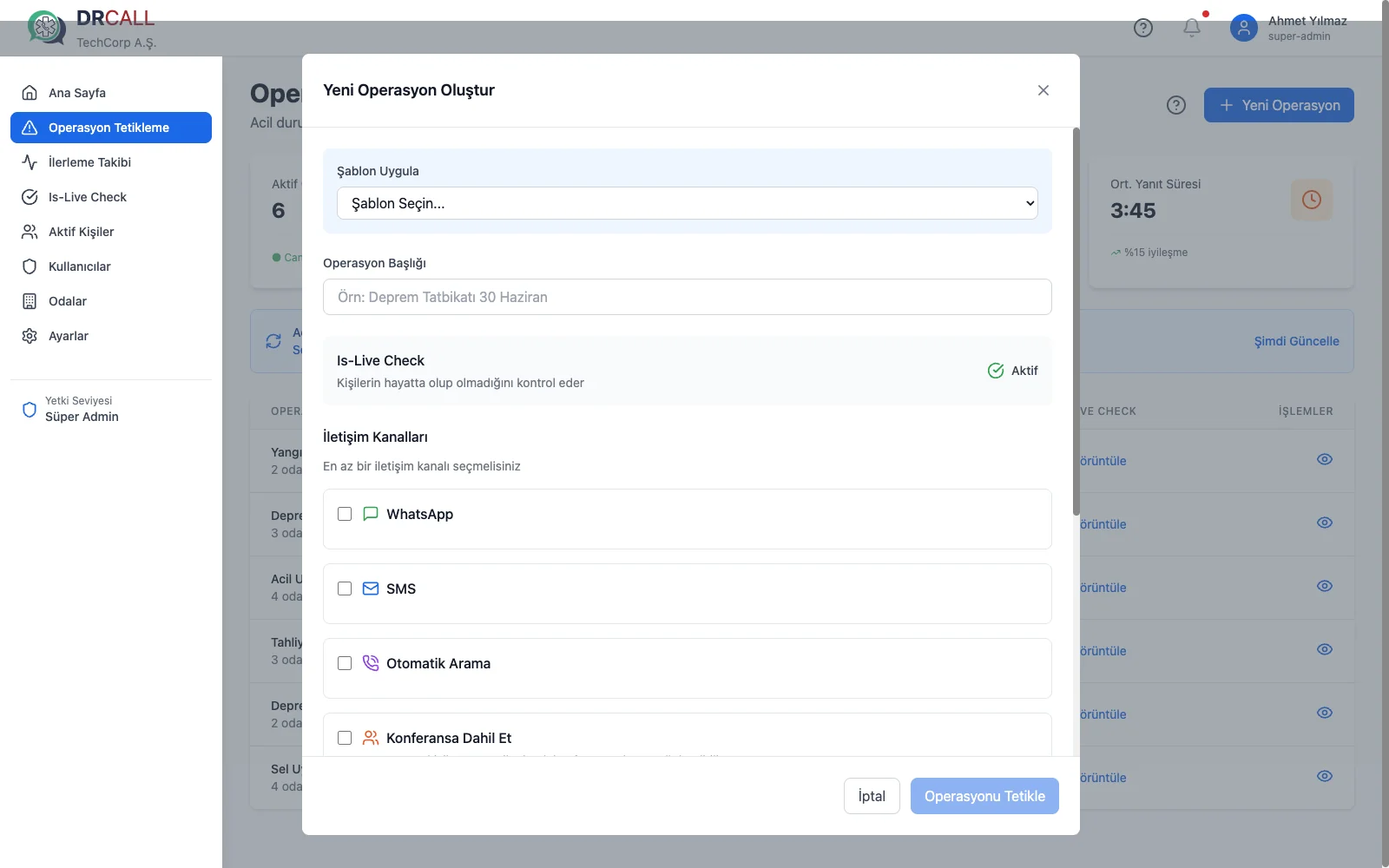
Pick the scenario, confirm groups and channels, start the operation
The operator picks one of the prepared scenarios; which groups are contacted over which channels, and the message text, are defined in advance. For automatic triggers the same screen serves as the cancellation window.
- Access levels: super admin, admin, sub-admin, operator
- Drill mode: the same scenario is flagged as a drill and run
On the staff side
One tap for “I am safe” or “I need help”
The mobile app opens the notification and the person reports their status with one tap. When “I need help” is chosen, location is sent with that reply; at no other time is location tracked.
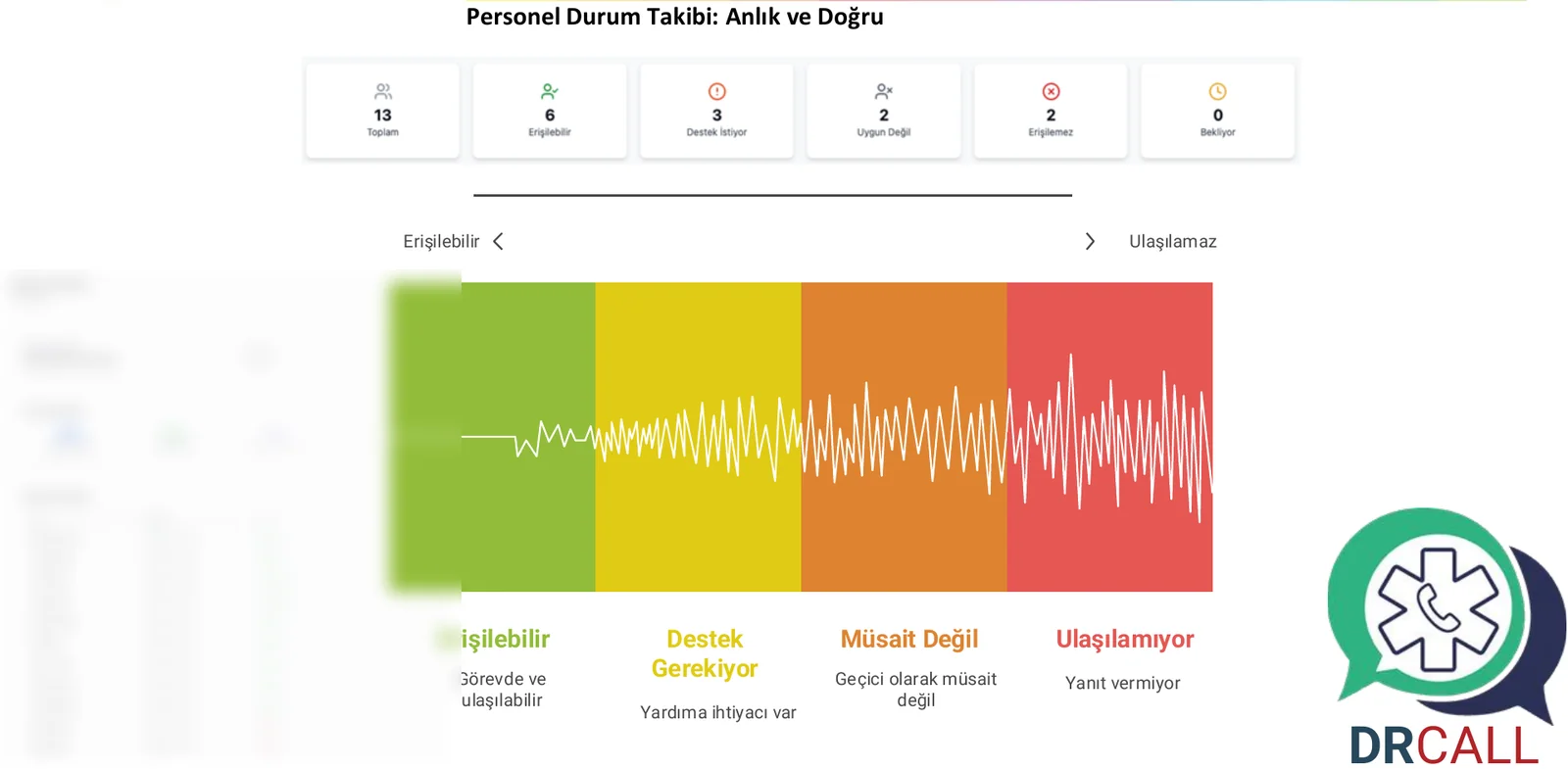
Signal logic
Every channel’s signal is a separate piece of information
In an earthquake the internet is the first thing to go. Dr. Call triggers channels in parallel and merges equivalent signals; it does not ask the same thing twice over two channels.
| Signal | What it tells you |
|---|---|
| WhatsApp single tick | Phone off or no internet. |
| WhatsApp double tick | Phone on, message delivered. |
| WhatsApp read | Saw the message but did not reply; busy or deliberate. |
| SMS delivered | The line works; reachable even without internet. |
| Call answered, key pressed | Replied and reported their status. |
| Call answered, no key pressed | Critical signal: the person may not be conscious; flagged as priority. |
| Call not answered | Not at the phone or could not answer; next channel and escalation kick in. |
Integration and deployment
Built on top of your existing infrastructure
There is no separate data-entry screen to maintain for the staff list or the alarm sources.
Staff data
The contact list is loaded by hand, by Active Directory sync, from a web service or from an Excel template. Who is called in which scenario is defined by groups.
Triggers
AFAD (Türkiye) and USGS (global) earthquake feeds start a scenario according to the threshold. The building’s fire panel connects through a dry-contact input. Complex integrations such as SCADA or Modbus are not part of the core; they are handled per project.
Voice infrastructure
Calls and the conference bridge run on Tecmony’s voice gateway. The organisation supplies its own SIP trunk or uses Tecmony’s carrier connections. Once a 444 number or short code is allocated, the SMS flow runs from that number.
Deployment model
Two options: in the organisation’s own environment (the voice gateway runs as a Docker container next to the application) or in the central environment Tecmony operates. Voice traffic leaves from a data centre in Türkiye.
Regulation and records
Documenting who was reached is an obligation
Turkish Occupational Health and Safety Law No. 6331 requires organisations to have an emergency plan and communication arrangement; AFAD drill obligations require documenting who was reached.
In Dr. Call every message, reply and escalation step is written to the operation log with a timestamp. A drill is the same scenario run without waiting for a real crisis; the result report comes from the system. The log is designed append-only: past records cannot be altered or deleted.
What Dr. Call does
- Multi-channel reach and status collection
- Outbound and inbound conference bridge
- Automatic triggers and escalation
- Time-stamped operation log and drill report
- Staff list from Active Directory, web service and Excel
What it deliberately does not do
- Continuous location tracking (location goes only with an “I need help” reply)
- Health monitoring or employee performance tracking
- Public warning broadcasts
- Deciding instead of the operator; the system alerts, it does not block
- Interpreting spoken replies with speech recognition (on the roadmap)
Works with
Related products
Dr. Call uses your existing communication infrastructure; it is deployed alongside the following.
WhatsApp Products
Infrastructure options for delivering notifications over WhatsApp.
Frequently asked
Questions asked before deciding
For a question not covered here, write to us; we will add the answer.
Which channels does it use to reach our staff?
WhatsApp, SMS and voice go out in parallel; mobile app and Microsoft Teams notifications can be configured too. Channels back each other up: one channel failing leaves nobody out of scope.
Does the system work if the internet goes down in an earthquake?
That is exactly why it does not depend on one channel. SMS needs no data connection and gets through as long as the network is up; voice calls remove the unread-message problem. WhatsApp and app notifications stay active for staff who do have data.
Is the alarm automatic, or does someone have to press a button?
Both are possible. AFAD and USGS earthquake data and the fire-panel signal arrive directly in the system; the organisation defines which scenario runs above which magnitude. Whether to proceed fully automatically or with operator approval is decided together at setup.
How do we see who was reached and who is safe?
Staff reply by keypress or message; on the operations screen each person’s status updates live and the safe, needs-help and unreachable counts are totalled. Critical signals such as “call answered but no key pressed” are flagged separately.
What happens with staff who do not respond?
Anyone the message reached but who did not respond is escalated and reported to their manager. Every step is time-stamped, so after the crisis you can document who was reached and when.
How does it bring the crisis team together?
Two ways. In an outbound conference the system calls the team and bridges those who answer into one room. In an inbound conference an authorised person calls the system’s number, is recognised by caller ID or enters a PIN, and joins the room. Standing rooms have their own number; ad hoc rooms open during a scenario.
Can we run a drill without waiting for a real crisis?
Yes. Drills are one of the system’s ordinary uses; the same scenario is flagged as a drill and run. The result report serves the emergency plan under Law No. 6331 and AFAD drill documentation.
Do we have to enter the staff list separately?
No. The list syncs from Active Directory, comes from a web service or is uploaded with an Excel template. Who is called is defined by location, unit and role groups.
See your own crisis scenario live
In an online session of about 30 minutes we walk through the flow, from alarm trigger to the staff status screen and the conference bridge, shaped to your organisation. Then we set targets together using your own headcount.
Or reach us directly: +90 (216) 912 00 79[email protected]