


Cloud contact centre platform · Solution Partner
Inbound calls, outbound campaigns, WhatsApp and web chat on one agent screen
Voyce brings the whole job of a contact centre onto a single platform: queues and routing, automated dialling, call recording and quality scoring. Agents work from a browser; supervisors monitor live, pull reports and change the call flow themselves, on the same system.
Tecmony is a Voyce solution partner. Licensing, installation and configuration are ours, and so is first-line support. We also build the reports, integrations and call flows specific to your operation, so your request does not join a third party’s queue.
Capabilities
Everything you expect from a contact centre, in one system
From answering the call to scoring the agent, a contact centre’s daily work in one system.
Inbound calls and queue management
Trunk and dial plan definitions, inbound routes, time conditions and announcements sit on one administration screen. Queues can be voice, video or text; the waiting-time announcement, abandoned-call e-mail and voicemail are set per queue.
Outbound dialling and campaigns
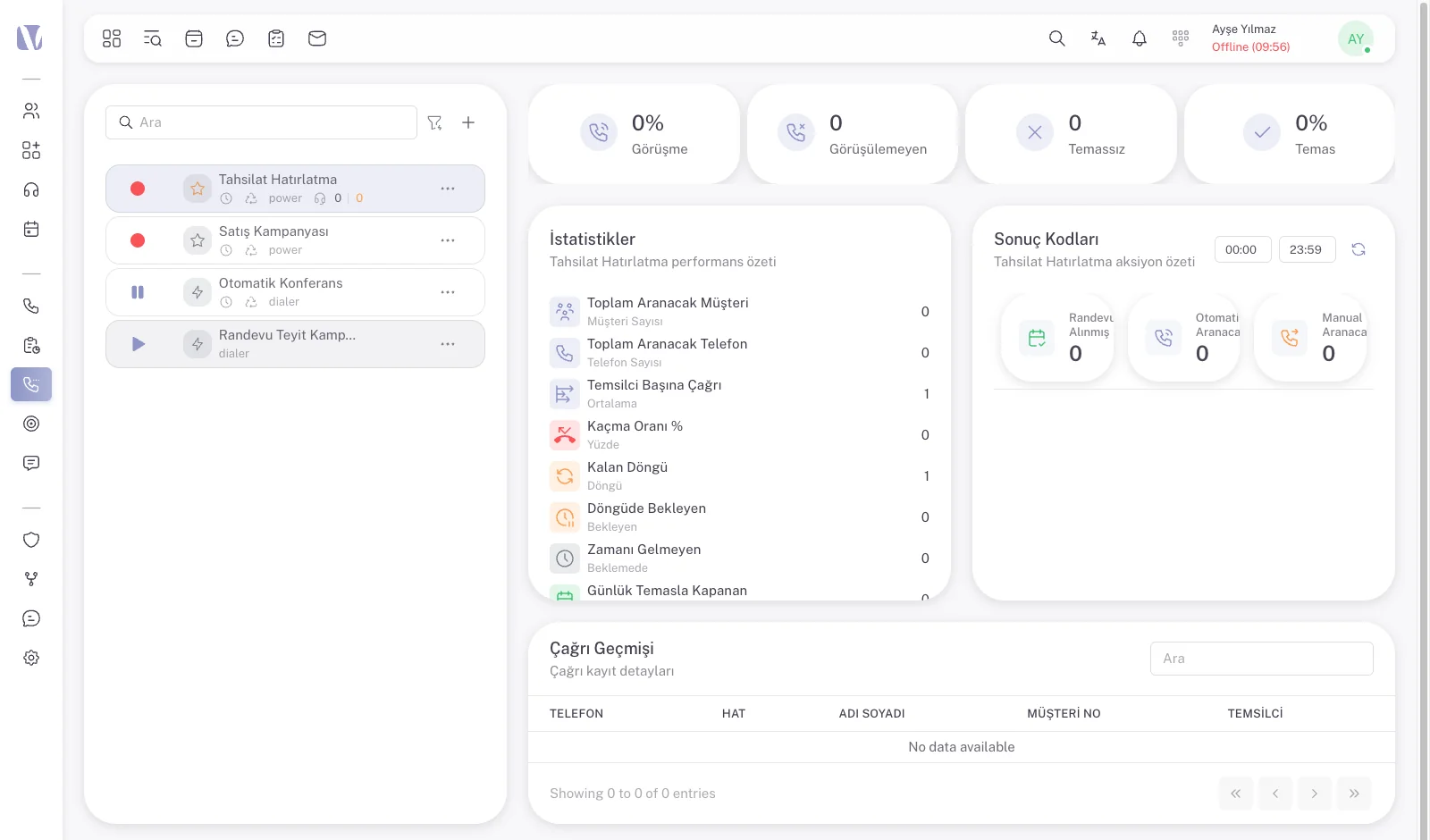
The auto-dialler lists campaigns per project and runs in power and dialer modes. Reached, unreached, no-contact and missed rates show on the campaign screen as the campaign runs. Goal management and bulk sending live in the same section.
Agent desktop
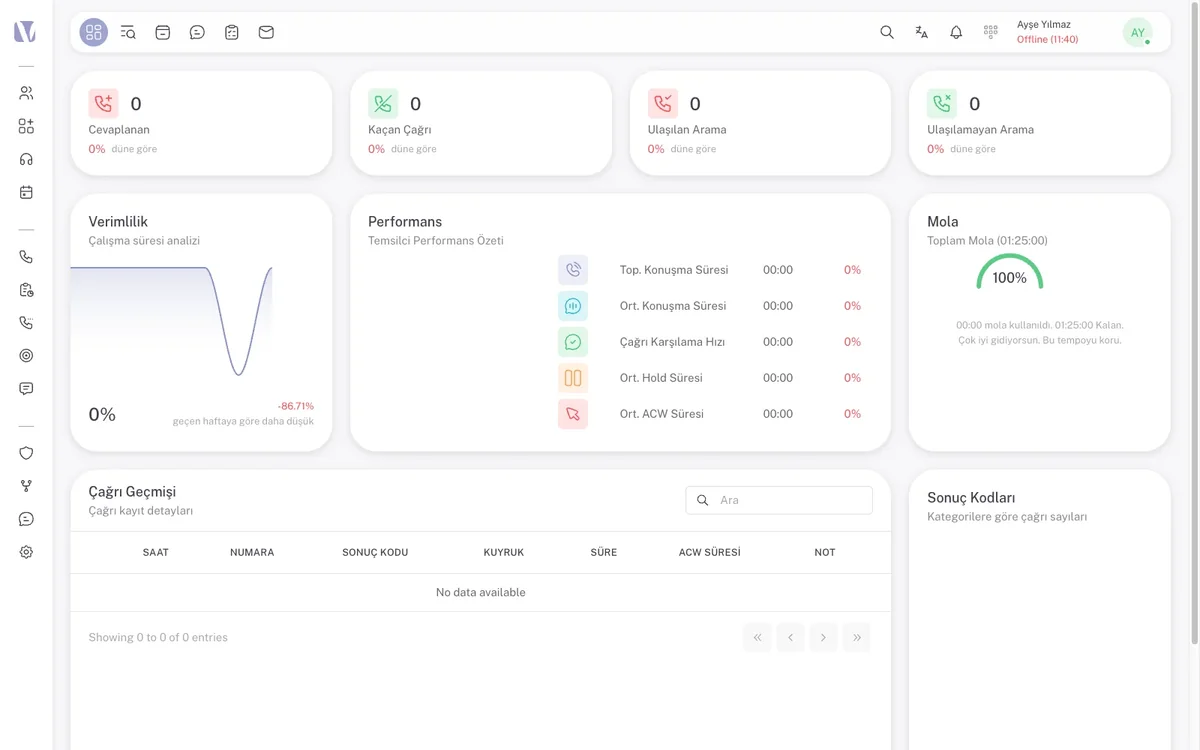
The browser-based panel shows the status timer, today’s answered and missed calls, productivity and performance cards, the break counter and call history side by side. The softphone on the right carries dial, message and queue tabs. Function keys switch between panels.
Supervisor wallboard and live monitoring
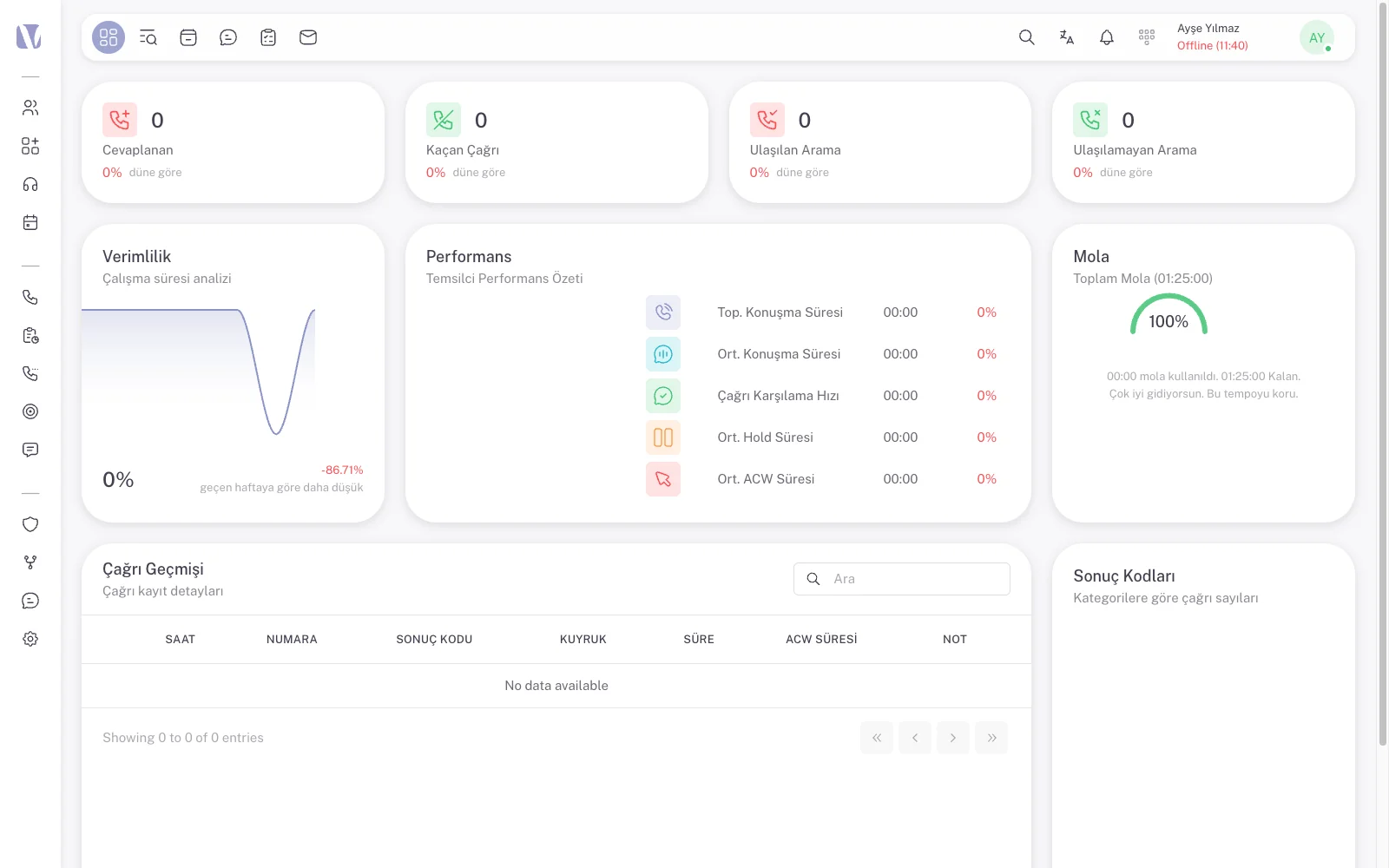
The agents screen shows waiting, missed and answered calls, available and on-break agents, and average answer and talk times in real time. The wallboard is arranged from drag-and-drop widgets for a large screen; the call monitoring screen lists ringing, waiting and active calls per project.
Call recording and quality evaluation
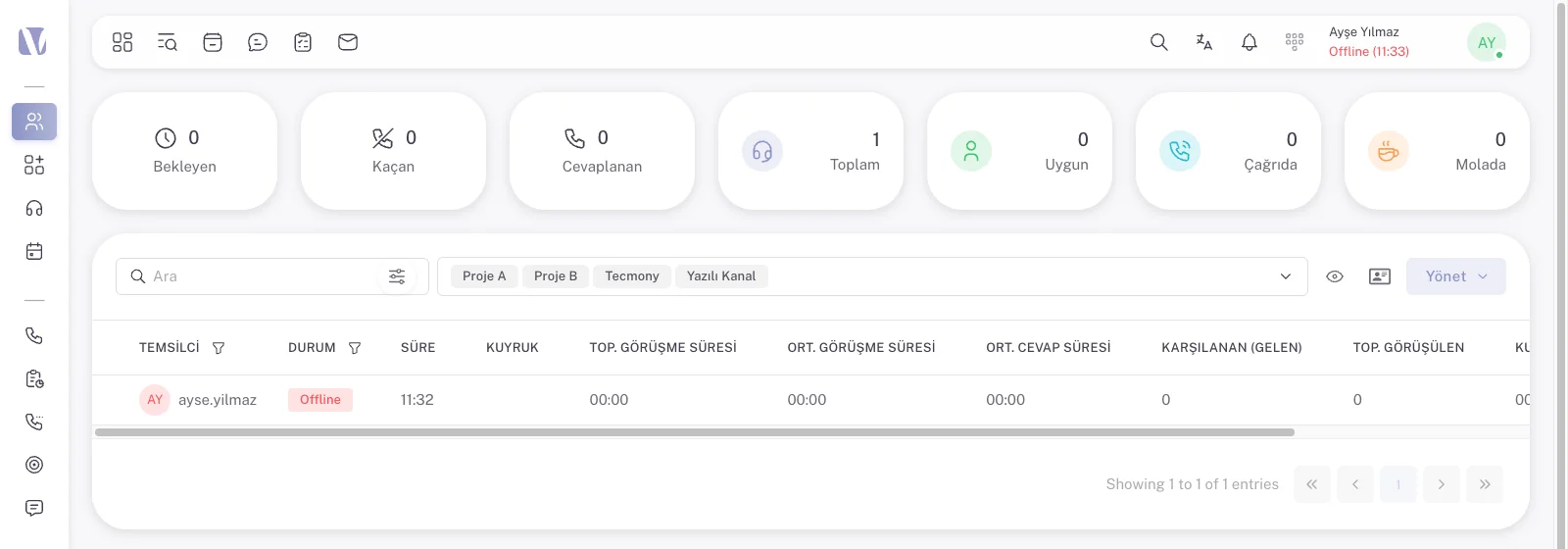
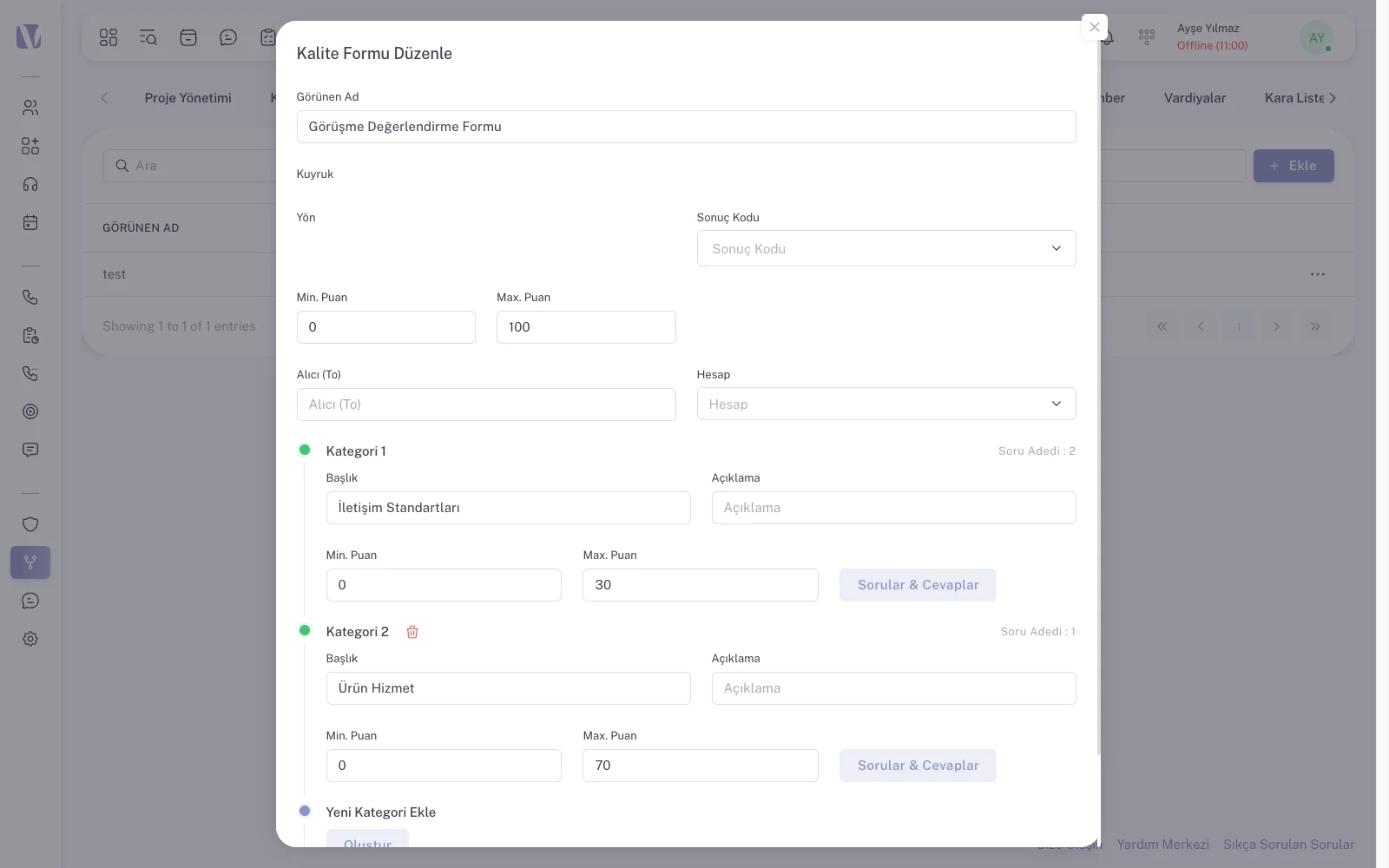
Every conversation is recorded and listed on the call records screen with direction, queue, disposition code, transfer details and campaign. Quality forms are defined in operations management; evaluator, form name, quality score and the AI evaluation appear on the same record.
Reporting
The report builder works from category, report, time format and filters; generated reports are kept under past reports. The file name in the call detail report matches the recording file exactly, so finding a recording in the archive is straightforward.
Messaging channels
WhatsApp, web chat, Telegram, SMS and e-mail arrive in the same inbox the agent uses for voice calls. Conversations are tagged, annotated and shown with their history; whoever is waiting in the queue is visible on the same screen as the active chat.
CRM and integration
The platform has its own CRM screen; the customer card opens with the call. External systems connect over the REST API with API keys, and the HTTP request node inside the IVR queries your own system while the call is still live.
Appointments, calendar and tasks
The appointments module, calendar and task list come as standard in the operations menu. With the SMS module the system can send an automatic “we tried to reach you” message, an appointment reminder or a location message.
Screens
The screens agents and supervisors look at all day
Agent desktop
After logging in, the agent picks a project and queue, sets a status and stays in one window all day. The status timer is at the top, today’s answered and missed calls and productivity cards in the middle, call history with disposition code and after-call-work time below, and the softphone on the right. Messaging, CRM and calendar open with function keys.
Supervisor wallboard and live monitoring
The agents screen shows who is on a call, on a break or available, with average answer and talk time, break used and productivity per person. The wallboard is built from widgets for a large screen, and the call monitoring screen lists ringing and waiting calls per project.
Call records and quality score
Every call is listed with date, number, agent, direction, queue, disposition code, duration, transfer details and campaign. Quality evaluation is not kept in a separate module; evaluator, form name, quality score and the AI evaluation continue on the same row. The file name in the report matches the recording.
Outbound campaign
The campaign list is loaded, the dialling mode is chosen (power or dialer) and agents are placed in the queue. While the campaign runs, total, reached, unreached, no-contact and missed counts and the contact and reach percentages move on the same screen; which number went to which agent is visible row by row.
Which channels meet on one screen?
Channels
Voice
Video
Web chat
Telegram
SMS
Social media messages
Channel providers are defined in settings: AI, text-to-speech, speech-to-text, social media, SMS and e-mail providers are each connected separately. On WhatsApp only approved templates can be sent; when the messaging window closes, the system prompts you to send a template.
Call flow
Someone on your team builds the IVR; nobody waits for us
IVR
Nodes you can use in a flow
The IVR tab in system management is a visual flow designer. Greeting, menu, data lookup and hand-off to an agent are placed on the canvas as nodes and connected. If a menu prompt changes, you do not commission a recording; you type the text and the text-to-speech provider generates the announcement.
- Text-to-speech: typed text becomes the announcement.
- Menu and DTMF: branching on the digit the caller presses.
- HTTP request: an order, balance or customer lookup while the call is live.
- Condition: the flow splits on the data returned, such as “customer found / not found”.
- Time condition: working hours, weekends and public holidays.
- Variable assignment: data attached to the call travels to the agent screen and into reports.
External integration is done on the same screen. Querying a hospital appointment service with an ID number and date of birth, then routing to a menu or an agent depending on the result, is a scenario built in the IVR without writing code.
Messaging
Web chat, WhatsApp and the AI agent in the same flow designer
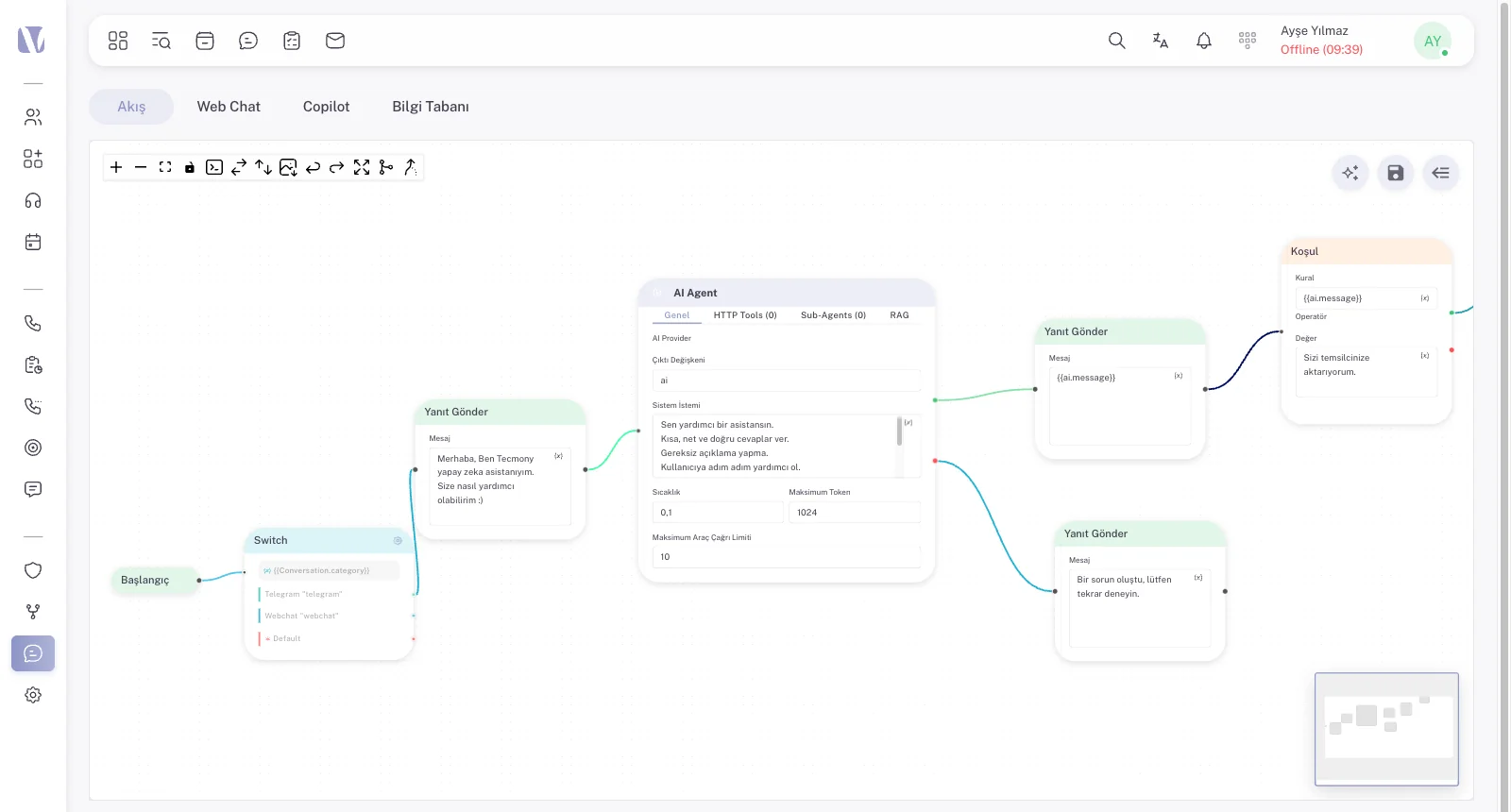
The messaging module has eight tabs: flow, web chat, copilot, knowledge base, general settings, HTTP tools, sub-agents and RAG. In the flow designer an incoming message branches by channel, is answered by rule, and is assigned to an agent or to an AI agent. Distribution is round robin or sequential.
Web chat widget
You define the pre-chat form fields and department selection; a GDPR consent box with a link to your agreement is built in. Working hours and the offline message are configurable; proactive messages and quick replies show by page URL. The embed code is generated with a queue selection.
Canned replies and templates
In a chat scenario each canned reply is linked to a next step: target message, target queue, hand to bot, or finish. SMS, e-mail and WhatsApp templates are managed per channel; WhatsApp templates are built with header, footer, buttons and variables through the approval flow.
AI agent and copilot
For an AI agent added to the flow you set the provider, system prompt, temperature, maximum tokens and tool-call limit. The knowledge base and RAG tabs let the agent answer from your own documents; the copilot suggests replies to the agent during a conversation. The message box offers translation, file attachment and voice input.
Tecmony’s role
As solution partner we install, run and extend the platform for you
We are the party that licenses Voyce, installs it and supports it from the first call. The contract, version and licence relationship with the vendor is ours to manage; you deal with one counterpart.
Licensing
Voyce is licensed per agent, per month. The voice-channel agent licence, the messaging-channel agent licence and speech analytics (Voyce AIQ) are separate items, so you pay only for the channels you use. The contract sets a minimum agent count, which can be increased later.
Installation and configuration
Voice-channel setup, messaging-channel setup and IVR configuration are planned in person-days. Queues, disposition codes, profiles and trunk integration are defined together with you before go-live.
First-line support
An agent login issue, audio quality, a dropped trunk or a report request comes to us. We measure the cause ourselves; if something has to go to the vendor, we take it there and follow it up, not you.
Training and custom development
Agent and supervisor training is delivered online at go-live, with refresher training on version upgrades. A custom report, an extra integration or a different flow is taken on by our own development team and scoped separately.
How we work
Five steps from installation to go-live
- Requirements form and kit listHow many agents, which channels, how many trunks, which integrations? A requirements form settles this; the quote itemises voice channel, messaging channel, speech analytics and installation effort separately.
- Environment: cloud or your own serverVoyce runs in the cloud or on your organisation’s own server. On your server we connect over VPN and carry out installation and updates there.
- Number and trunk integrationYour existing numbers are delivered into Voyce over our VoIP Router infrastructure; SIP trunks are defined in system management. The number is not ported; the call’s destination is written as a rule.
- ConfigurationQueues, the IVR flow, disposition codes, quality forms, profiles and users are defined with you. In a multi-project setup each project gets its own queues and profiles.
- Training and go-liveAgents and supervisors are trained, test calls are made and the system goes live. From then on first-line support and version updates stay with us.
Administration and security
Profile-based permissions
A profile is not a checkbox list but a resource-level permission set: for each profile you pick which projects, queues, users, disposition codes, IVRs, directories, reports and trunks it may access. Profiles can be opened per customer or project, and a user can be assigned to more than one project.
Operational definitions
Statuses, disposition codes, tags, automation rules, quality forms, agent scripts, the directory and the blacklist are gathered under operations management. The shift screen keeps start, end, break, lost time and leave per agent.
Session security
The password policy requires at least 8 characters including a letter and a digit. Each user sees their own recent sessions with IP address, device, browser and timestamp. Theme, language and display preferences are stored with the account and follow the user to any machine.
Who is it for?
- Operations whose call flow changes often: your own team changes a campaign, an announcement or a menu without raising a ticket.
- Teams running voice and messaging in separate products: WhatsApp, web chat and calls meet in the same agent and the same report.
- Organisations that want deep integration with their own systems: HTTP lookups in the IVR, a REST API and a CRM screen are built in; custom development requests come straight to us.
- Organisations with a data residency policy: the system can run on your own server.
- Multi-project or multi-brand setups: queues, profiles and reporting per project.
What is out of scope?
Cloud or your own server?
| Criterion | Cloud | Your own server |
|---|---|---|
| Server and operation | Ours; you buy no hardware | Yours; we connect over VPN to install and update |
| Data residency | Cloud environment | On premises, under your own policy |
| Version updates | Applied centrally | Applied in a planned maintenance window |
| Agent access | Browser | Browser, over the corporate network or VPN |
| Licence | Per agent, per month | Per agent, per month |
Licensing and support run under the same contract in both models. Your IT capacity, internet redundancy and data policy decide which one fits; we price both options at the quotation stage.
Our other contact centre options
Voyce is one of three contact centre approaches we supply. For a ready-made cloud service there is Alotech; for a PBX there is 3CX. The table comparing all three on the same criteria is on the Contact Center Solutions page.
Frequently asked
Frequently asked questions
How is the Voyce licence calculated?
Per agent, per month. The voice-channel agent licence and the messaging-channel agent licence are separate items; speech analytics (Voyce AIQ) is optional. The contract states a minimum agent count, and going above it is always possible. Installation, IVR configuration and out-of-scope development are priced separately in person-days. The figures are given in the quote rather than here, because they depend on the combination of channels and seats.
Can we change the call flow ourselves?
Yes. The IVR is built from nodes in the visual designer under system management; announcement text, menu options and routing targets are changed there. No recording is needed for an announcement; the text-to-speech provider generates it. During installation we build the first flow with you and train your team on the AI-assisted IVR; after that you make the changes yourself, or buy them from us as a service.
Can we handle WhatsApp conversations in Voyce?
Yes. Your WhatsApp number is connected to Voyce, messages land in the agent’s inbox and are answered on the same screen as voice calls. Only approved templates can be sent; once the messaging window closes, the system asks you to send a template. Messaging can be added to an existing Voyce installation later, in which case the system is upgraded, the messaging flow is configured and the number is integrated.
How does quality evaluation work?
A quality form is defined in operations management. The evaluator listens to the recording and fills in the form; evaluator, date, form name, quality score and any penalty appear on the call record row. The same row also carries an AI evaluation field. If you want speech analytics, the Voyce AIQ module is added to the licence, and agents follow their own quality scores in the quality tab of their profile.
Does it connect to our existing CRM?
There are three routes. The HTTP request node in the IVR queries your system while the call is live and attaches the result to the call. API keys in settings enable two-way integration over the REST API. You can also use Voyce’s own CRM screen and move customer data into it. Which one fits depends on the services your CRM exposes; the integration scope is settled at the quotation stage.
Is there shift and workforce planning?
Shift planning and adherence tracking are included: date, agent, start and end time, break duration, lost time, paid and unpaid leave are kept per agent. Workload forecasting and automatic schedule generation are out of scope, and we say so explicitly when answering a tender.
Is user activity logged?
Each user sees their own session history in the security tab of their profile: IP address, device, browser and timestamp. Call records also keep who evaluated, who transferred and who ended the call. If you need a system-wide audit report, we define its scope together.
How do you bring our numbers into Voyce?
Your numbers terminate on our VoIP Router infrastructure and are delivered into Voyce from there. Because the number sits in the carrier’s data centre rather than in your building, an outage on the office side does not drop the call. If you later move to another platform, the number is not ported again; only the delivery target changes.
See Voyce on a live system
Let’s walk through the agent desktop, the supervisor wallboard and the IVR designer with your own scenario. For a demo, just tell us your agent count and the channels you use.
Or reach us directly: +90 (216) 912 00 79[email protected]