


IP PBX · 3CX Silver Partner
Run your corporate PBX on 3CX, in the cloud or on your own server; licence, installation and support from one place
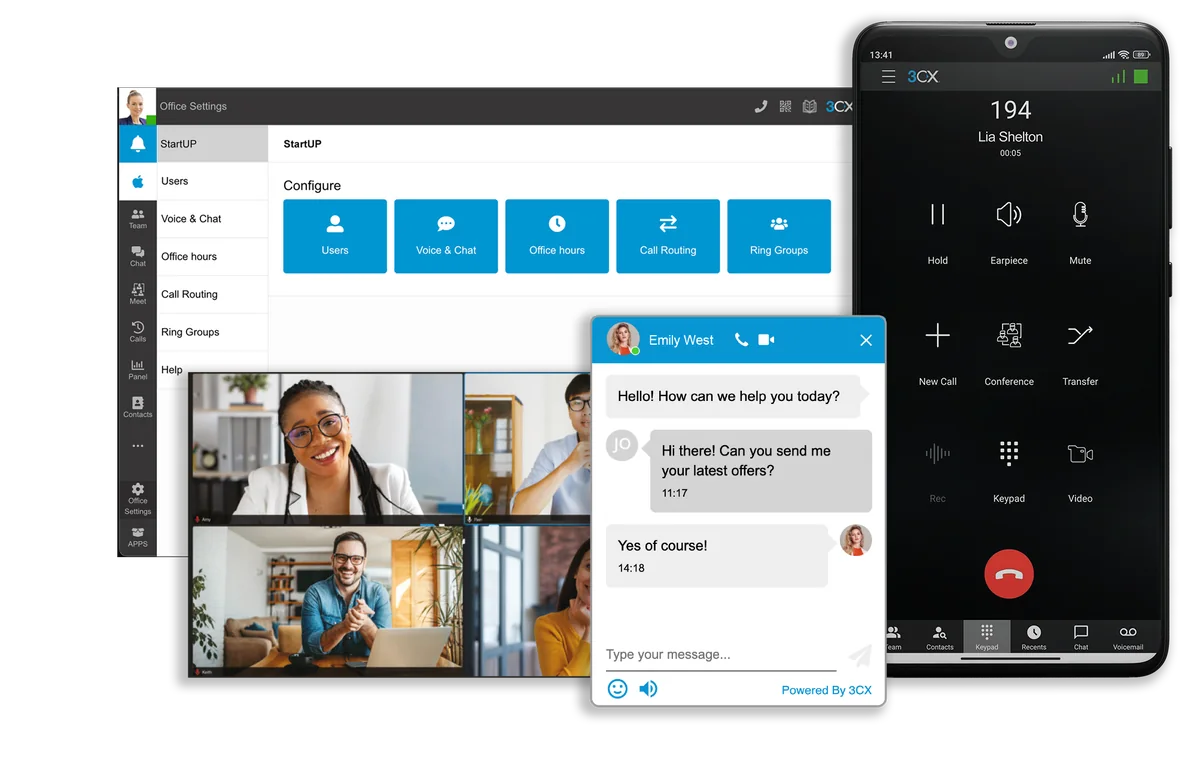
3CX is an IP-based phone system built for businesses. Extensions, call routing, voice menus, video conferencing and internal chat in one product; your team makes and receives calls on the office number from anywhere, through web, mobile and desktop apps.
Tecmony is listed as a Silver Partner in 3CX’s official reseller directory for Türkiye, and our team holds the 3CX Basic and Advanced certificates. You buy the licence from us; installation, configuration, integration and first-line support stay with us.


What does Silver Partner mean?
3CX tiers its partners by how much they work with the product and how many certified engineers they have. The Silver tier marks a team that installs and runs the product, not one that only resells it. In practice: you get the licence, installation, integration and support from one place, and when something goes wrong you do not first have to argue about who is responsible.
That does not mean installing a PBX and walking away. How the numbers arrive from the carrier, which rule distributes the call and which data moves to the CRM are the same team’s job. Our voice infrastructure expertise comes from exactly here: we know the PBX the call lands on and the carrier connection that feeds it.
Capabilities
Everything expected of a corporate PBX, plus mobility
Call management and routing
Extensions, ring groups, a voice menu, routing by caller number and time of day. You make and receive calls on your office number from anywhere; calls between branches work like internal calls.
Web, mobile and desktop apps
The iOS and Android apps and the browser-based web client carry the same extension. Users connect through the 3CX app and WebRTC rather than raw SIP, so SIP ports do not need to be exposed to the internet.
Video conferencing
Video calls and conferencing are built into the PBX; no third-party software is needed. A conference can be started and managed from a mobile device.
Internal chat and WhatsApp
Team messaging stays inside the PBX rather than scattering across personal apps. WhatsApp messages are answered directly from 3CX.
Call recording and reporting
Conversations are recorded, and call and extension reports come from the management console. For queue and detailed call reports, the advanced reporting item is added to the quote.
CRM and Microsoft 365
Works with widely used CRM systems and Microsoft 365; the caller’s customer card comes up on screen. Which data is carried is decided together during installation.
How we work
Moving from your current PBX to 3CX: you keep taking calls while the old system is switched off
- Measuring the current stateHow many extensions, which numbers come from which carrier, how heavy the simultaneous call load is, which routing rules are in place. None of this is guessed; it is read from the current PBX records and it determines the licence level.
- Preparing the numbersNumbers are terminated in the carrier’s data centre over our VoIP Router infrastructure. From that point on, whether a call lands on 3CX or another platform is a matter of a rule.
- Running in parallelThe new PBX is installed in the cloud or on your own server, extensions and flows are defined, test calls are made. The old system stays up during this time.
- Cut-overRouting is switched to the new PBX. Because the numbers sit in our routing layer, there is no carrier-side porting process to wait for.
- Training and go-liveUsers are trained; configuration and support stay with us in the first period. Version updates run under maintenance.
Screens
Management console and web client
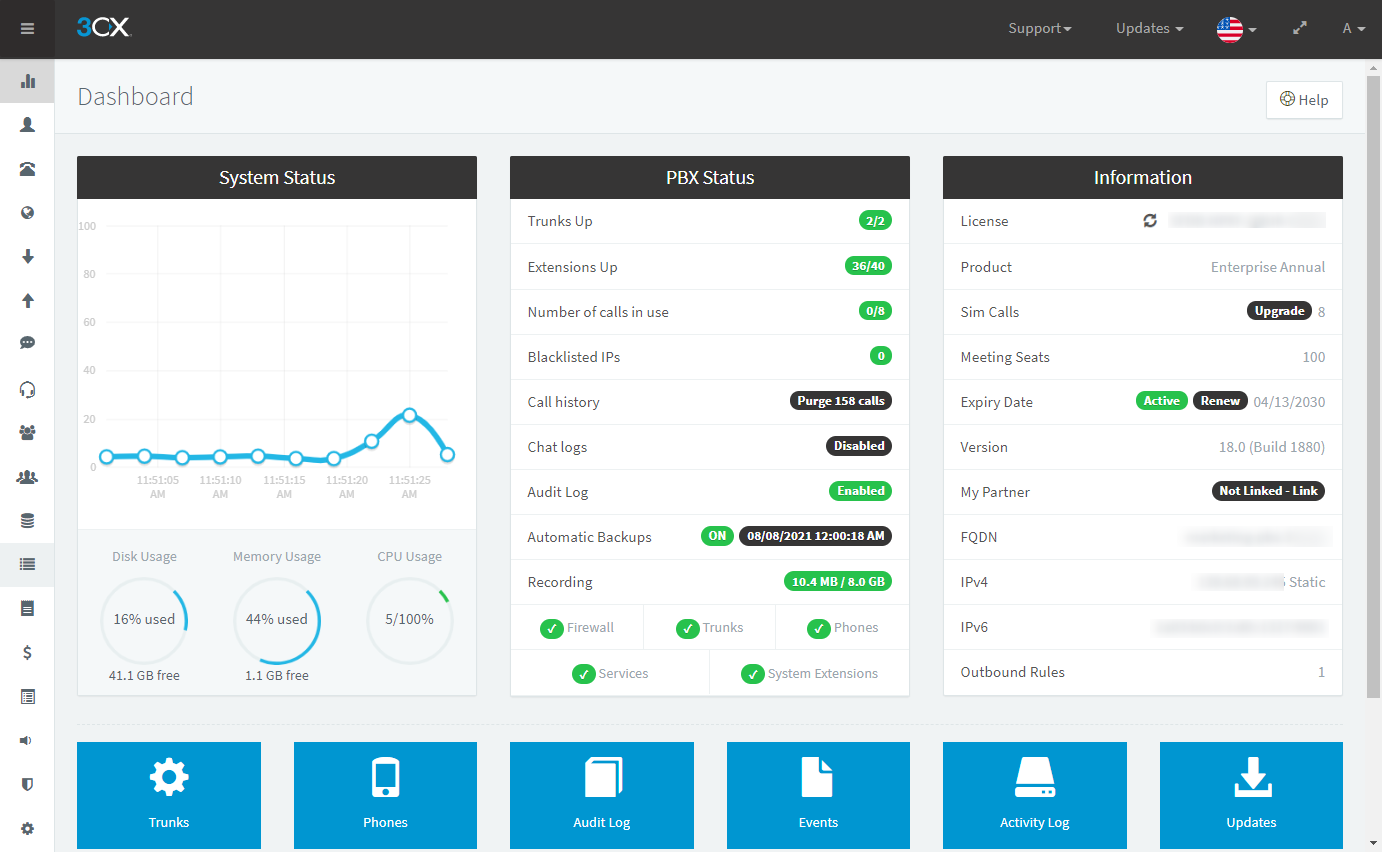
Management console
System status, trunk and extension health on one screen
The console shows whether services are running, the registration state of carrier trunks, whether extensions are connected, and licence detail on one dashboard. When something goes wrong, this is the first place to look.
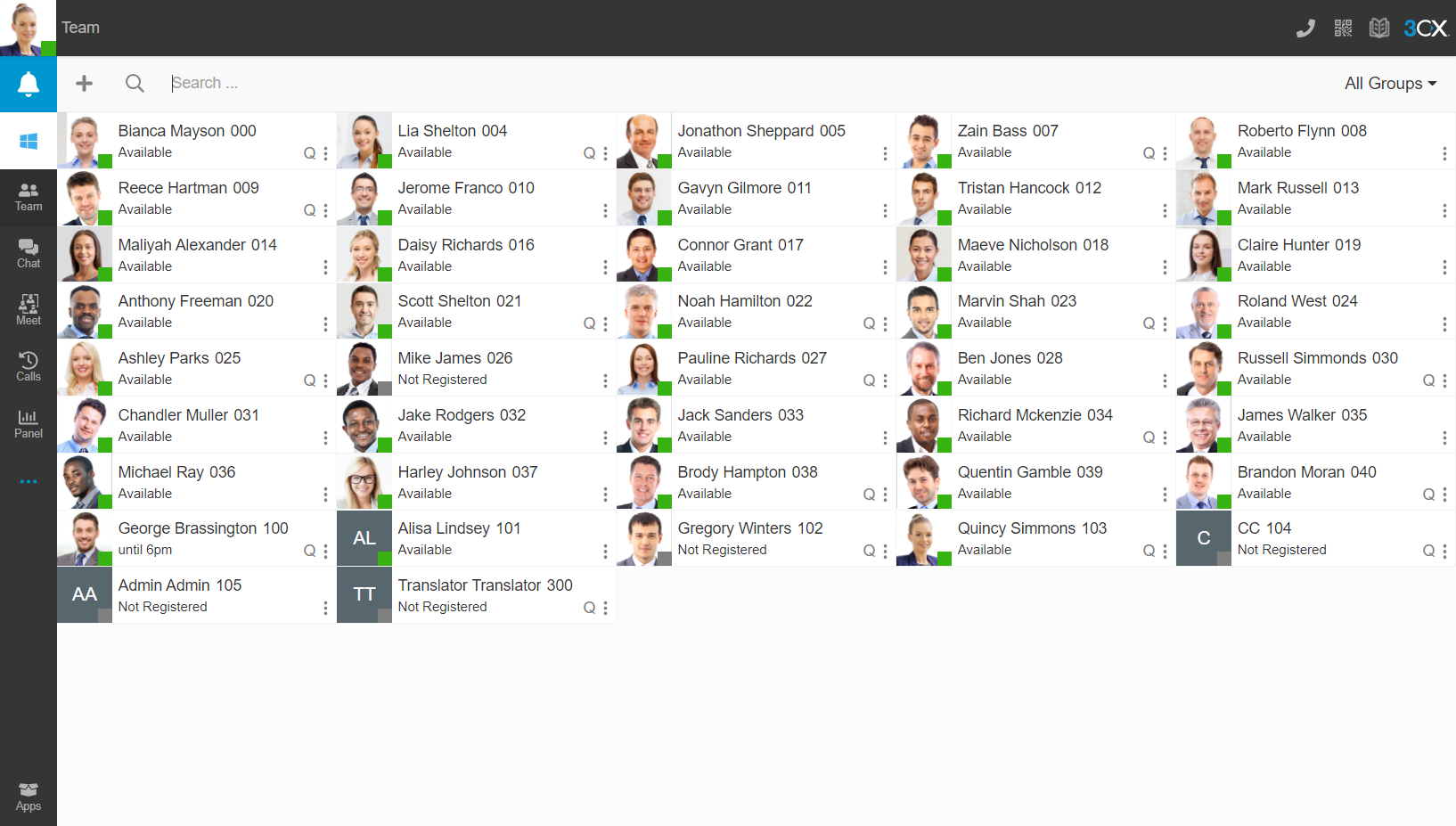
Web client
Calls, chat and video from the browser
The user opens a browser, signs in with their extension, makes and receives calls, sees colleagues’ presence, chats and starts a video call. It works without a desk phone; the same extension is also in the mobile app.
Licence model
Priced by simultaneous calls, not per user
3CX licensing departs from the usual PBX logic in one respect: what matters is not how many extensions you define but how many conversations run at the same time. In a hundred-person office, a hundred people are not expected to be on the phone at once; the right simultaneous call level is measured from your current PBX’s call records and can be raised later.
Where it runs
On your own server or in the cloud. Both are the same product with the same management interface; the difference is where the hardware and the responsibility sit. In a cloud installation, virtualisation and hosting appear as items in the quote.
Simultaneous call count
The result of the measurement. The licence is bought for that count and increased as you grow. Current prices and tiers change on 3CX’s side over time, so we do not print figures here; we share them at the quotation stage.
Edition
Which edition brings call recording, queue reporting and advanced features varies. We work out together which features you actually need.
What is in the quote?
- 3CX licence (by simultaneous calls) and its annual renewal
- Hosting (for a cloud installation)
- Installation and configuration
- Maintenance and support: software maintenance, updates, first-line support
- Advanced reporting (optional)
- Process analysis and consulting (person-days)
Assessed separately
- IP phones and headsets
- Number porting and the carrier connection (VoIP Router scope)
- CRM and in-house application integration effort
Who is it for?
3CX is a corporate phone system, not a contact centre platform. That distinction is the one most often confused when choosing.
- Organisations that need corporate telephony: internal communication, links between offices and corporate number management come first.
- Teams working outside the office: wherever they are, staff make and receive calls exactly as on their office extension.
- Organisations with several locations: calls between branches work like internal calls; no separate PBX per site.
- Organisations replacing an old PBX: moving a long-serving analogue or digital PBX to IP.
- If what you need is queue management, campaign dialling, quality evaluation and a multi-channel agent desktop, you are looking for a contact centre platform; see the comparison table.
With VoIP Router
The PBX manages the call; how the call reaches you is the job of the layer before it
If your number is tied directly to your office PBX, whatever happens to the office happens to your phone: roadworks cut the line, the power goes, a port fails, and the caller hears a busy tone. VoIP Router breaks that link: the number terminates in the carrier’s data centre and you write where the call goes as a rule.
A site failure does not take the PBX down
During an outage on the office side, the call is routed elsewhere, such as a cloud PBX or another branch. The routing layer runs separately in Istanbul and Ankara.
Different carriers in one pool
Numbers from different carriers and cities are gathered on one interconnect and distributed to 3CX by rule. Information travels with the call; the customer does not give it twice.
Compatibility issues are solved in between
Most problems such as keypresses not being recognised come from the two ends expecting DTMF in different forms. These are diagnosed at packet level in the SBC layer. If you change platform, the numbers stay with us; only the target changes.
3CX or Cloud PBX?
| Criterion | 3CX | Cloud PBX |
|---|---|---|
| What do you get? | A product: the licence is yours | A service: the PBX runs in our cloud |
| Where it runs | Your own server or the cloud | Tecmony’s cloud |
| Operational responsibility | Yours; maintenance and support from us | Ours |
| Licence | By simultaneous calls, annual | Included in the service fee |
| Hardware | Your own server (on-prem) or none (cloud) | No PBX hardware on your premises |
| Numbers | In both cases in the VoIP Router layer; not ported when switching | |
Frequently asked
Frequently asked questions
Do we buy the 3CX licence from you or from 3CX?
From us. As a 3CX Silver Partner we handle the licence, its renewal and the installation; the product is 3CX’s. We track the renewal date and place the order before the licence expires, so there is no interruption.
How many simultaneous calls should we license?
By measurement, not guesswork. We look at the number of simultaneous conversations at peak hour in your current PBX’s call records, and the licence is bought for that level. It can be increased later, so it is more economical to start from real load rather than the worst-case scenario.
Will our existing handsets work with 3CX?
IP phones that support SIP can generally be provisioned on 3CX, so in most cases your existing inventory is preserved. Not every device supports every feature in the same way, though: on some models auto-provisioning does not work or certain key functions are missing. For a model we have not tested before we do not give a firm compatibility guarantee; the device list is reviewed model by model before migration. Analogue phones do not connect directly; they need an adapter, or replacement is planned. You can also start with no handset hardware: the web, mobile and desktop apps carry the same extension.
Should we host it in the cloud or on our own server?
It is the same product either way and the management interface does not change; what differs is where the hardware sits and who maintains it. An on-premises installation suits organisations that want to keep the server and its backups in house, or that have a data residency policy. With a cloud installation, hardware, updates and infrastructure maintenance leave your organisation. The factors that drive the decision are your internal IT capacity, the redundancy of your office internet and your data policy; we weigh all three together.
Can users connect from the browser only? Do we need to open SIP ports?
Yes, they can. Users work through the 3CX app and the WebRTC client in the browser, so we do not expose SIP ports to the internet on the user side. The carrier connection is isolated on a separate network leg that talks only to our SBC. Opening port 5060 to the internet is the most common VoIP attack surface; we design the installation without doing that.
Who do we get support from when something goes wrong?
From us. We handle installation, configuration, maintenance and user training. A significant share of voice problems originate not in the PBX but in the layer outside it: the carrier connection, a protocol mismatch, a codec difference, or the two ends expecting DTMF in different formats. Voice infrastructure is our field too, so there is no argument over responsibility; SIP messages and the audio stream are examined from the capture and the failing step is measured.
What is the difference between 3CX and Cloud PBX?
3CX is a product: you buy the licence, it is installed on your own server or in the cloud, and the PBX is under your management. Cloud PBX is a service: you use the PBX functions from our cloud, there is no hardware on your premises and operational responsibility is ours. If you want to own the product and run it on your own server, 3CX; if you would rather not carry hardware and operations, Cloud PBX.
3CX demo and quote
Tell us your extension count, your locations and your current PBX; we will measure your simultaneous call need with you and show cloud and on-premises options in the same quote.
Or reach us directly: +90 (216) 912 00 79[email protected]