


Call recording and device management
Calls on company phones: recorded, transcribed and searchable in one panel
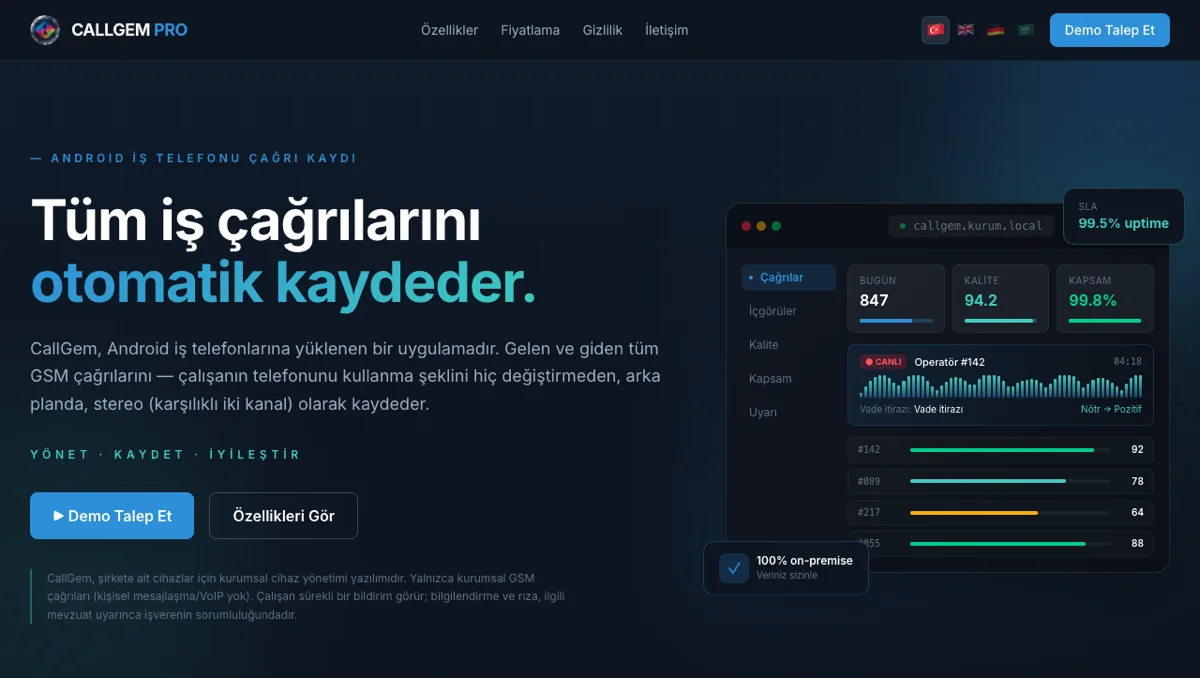
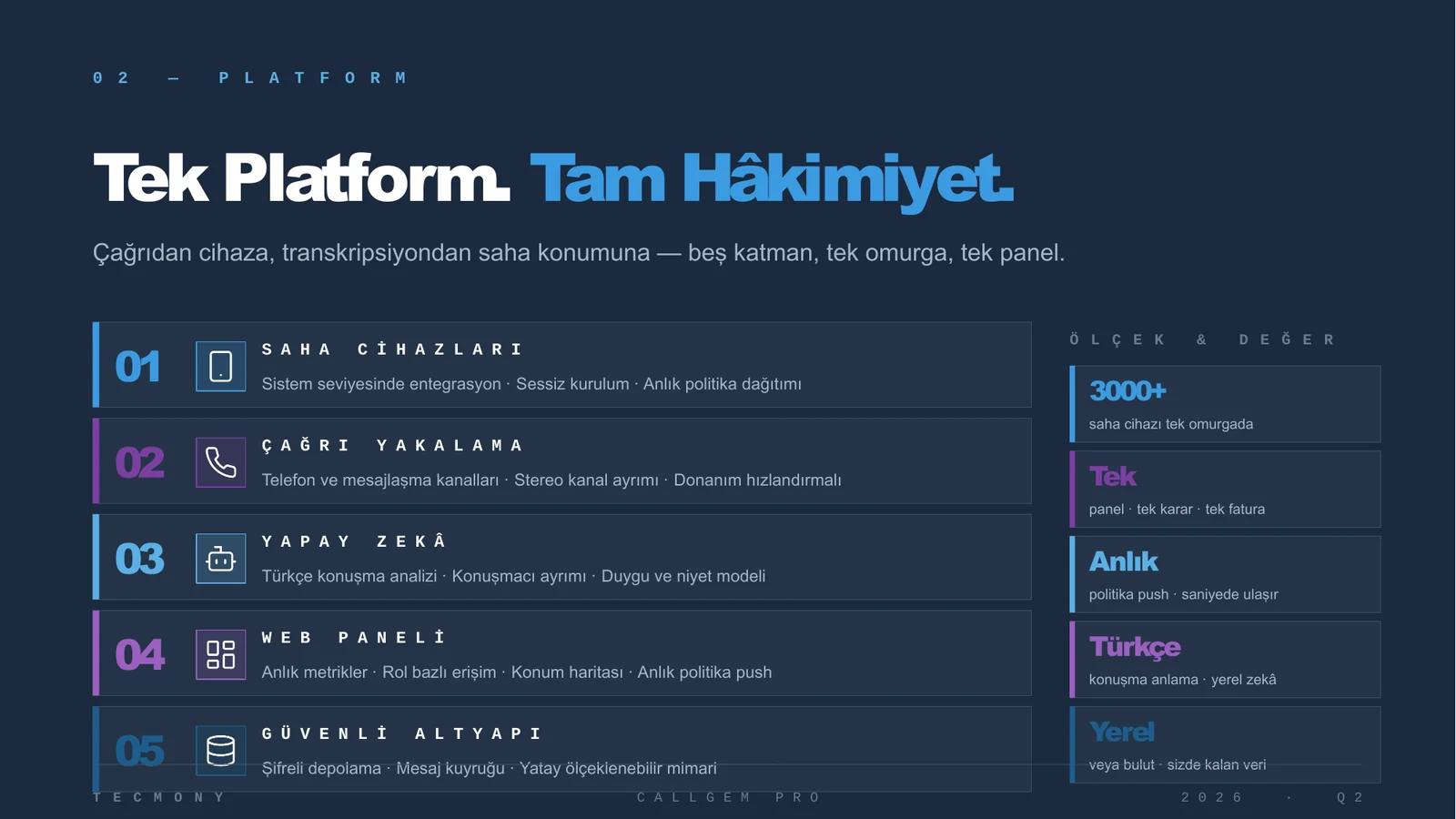
CallGem Pro is a call recording, speech analytics and device management platform built for corporate Android phone fleets. Calls that field teams and customer representatives make on company lines are recorded automatically under the recording policy the organisation sets, transcribed into Turkish text and made searchable in a web panel.
The employee does nothing during the call. The app runs in the background and uploads the recording to the organisation’s own server in chunks; if the network drops, it resumes where it left off. The same panel manages the phones’ inventory, apps and security policies, so a separate MDM product is not needed. Today the platform is being prepared for a fleet of several thousand devices at one corporate customer, while a second organisation runs an evaluation environment.
What gets recorded
GSM calls
WhatsApp voice calls
WhatsApp message archive
Who it is for
Teams that talk to customers by phone but do not sit in a contact centre
Calls through the PBX are already recorded. The gap is the company mobile phone: field sales, collections, branch and dealer teams, representatives who work from a mobile line. CallGem closes that gap.
Complaint and dispute review
“What was the customer told?” is answered from the record, not from memory. The call is found by number, agent or date, played back and read as text.
Quality and coaching
The quality team works on the whole call pool instead of a sample. Which agent struggles with which topic, and which calls carry risk, is visible in data.
Compliance and audit
A recording requested by a regulator or by internal audit is produced retrospectively. Who listened to it, and when, is logged as well.
Training
New staff are trained on real recordings and transcripts; good examples and phrases to avoid are shown concretely.
Phone fleet management
When staff change, phone handover, app installation and permissions are done remotely. A lost device is locked, located and, if needed, wiped.
One panel
Call recording, speech analytics and device management run from the same screen. IT sees the devices, quality sees the calls, management sees the reports.
Capabilities
One chain from recording to insight
Every capability is something visible in the panel: recording channel, transcript, score, report. These are features running in the installed system today.
Two-channel GSM recording
The employee’s voice and the other party’s voice are captured on separate channels and merged into stereo on the server. Speakers are separated by channel, not by guesswork.
- Opus compression
- Temporary storage on the device, deleted after upload
WhatsApp calls
WhatsApp voice calls made on the corporate line are recorded as well. The app attempts two-channel capture and falls back to mono if the device blocks it. The WhatsApp message archive is backed up separately.
Upload that survives outages
Recordings are uploaded in chunks over an encrypted connection to the organisation’s server. If the network drops, the recording waits on the device and resumes when the connection returns. Calls made out of coverage are not lost.
Turkish transcription
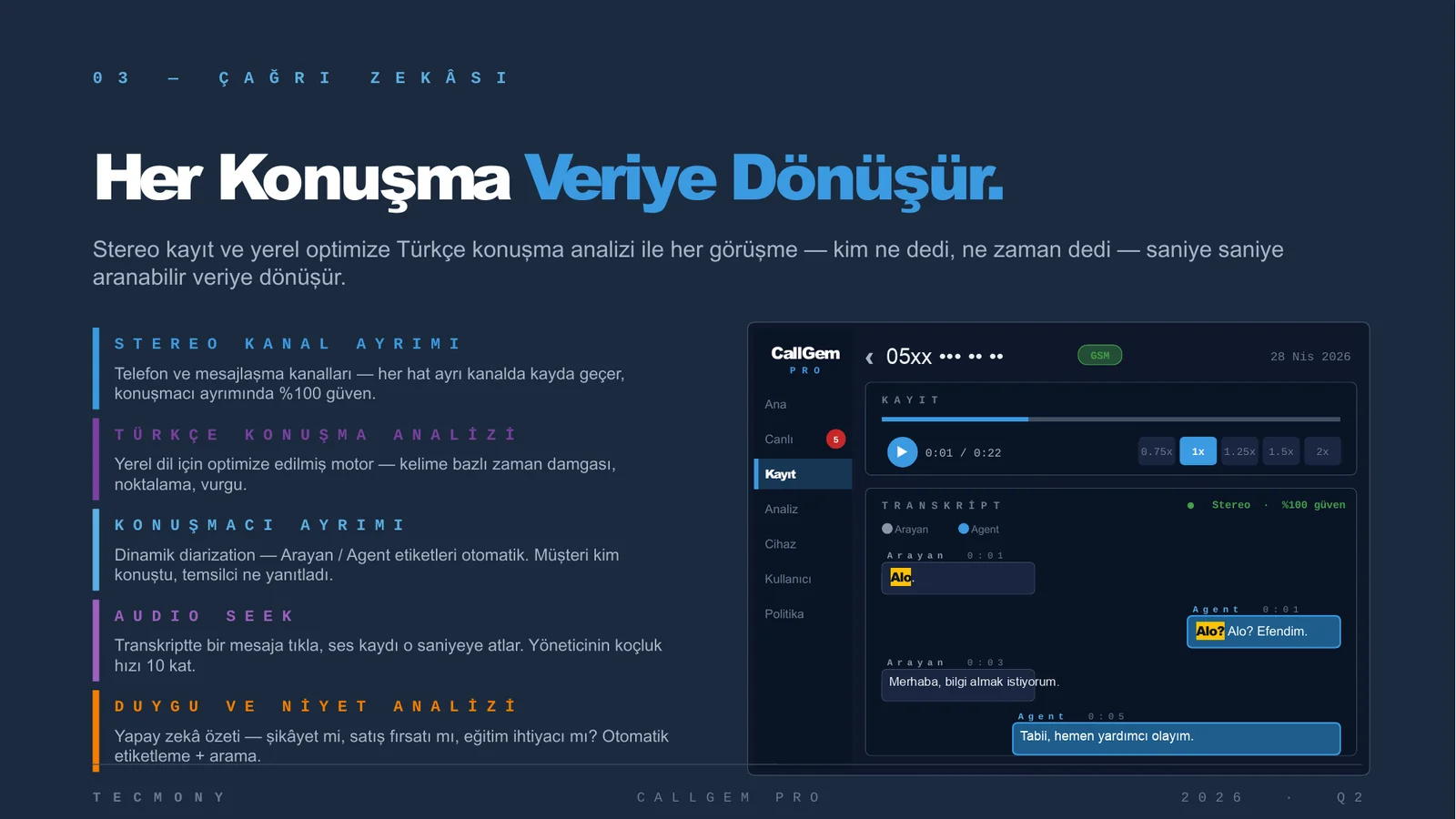
Every recording is transcribed by a Whisper-based model running on Tecmony’s own GPU server. No audio file is sent to a cloud service. Click a sentence in the transcript and the audio plays from that second.
AI call analysis
From the transcript the system produces a summary, sentiment, keywords, customer intent (hot, warm, cold), call outcome, next action and risk level. The agent is scored 1-10 on three axes; the final judgement stays with a person.
Reports and search
Calls are filtered by direction, source, branch, employee, device, date and transcript status. Reports export to Excel or PDF, can be scheduled and emailed. An operator screen allows transcript corrections.
Role-based access and audit trail
Admin, operator and viewer roles can be scoped to a region or branch. Listening, downloading, and viewing transcripts or reports are written to an access log that is never deleted.
Staff from Active Directory
The employee list is synchronised over LDAP / Active Directory. The person a phone is assigned to is picked from the directory; group assignment and PIN setup follow automatically.
Open API
Everything the panel does is also available through a documented REST API. Swagger documentation ships with the installation; your own reporting or CRM systems can draw on it.
Recording policy
Recording follows the organisation’s rules
Whether a call is recorded, and whether the other party’s voice goes into it, is the organisation’s decision; CallGem provides the mechanism that enforces it. Because recording is two-channel, the employee side and the other party can be kept technically separate.
Option 1: The other party is never recorded
Only the employee’s voice is recorded. No audio data of the other party exists, so their consent does not arise. This is our default recommendation.
Option 2: Recording by consent list
On calls with numbers flagged “recording consented” in the organisation’s customer system, the other party is recorded too. On every other call only the employee side is recorded.
Option 3: Spoken notice at the start
The other party hears a spoken notice that the call is recorded. If they object, recording continues one-sided and their voice is not captured.
The organisation decides as data controller, based on the law it is subject to (Turkish KVKK notice and explicit consent rules, employment contracts, sector regulation). Recording is not hidden from the employee: the app shows a persistent notification on the phone while recording is on. Recordings stay on the organisation’s own server, the retention period is configurable, and personal data in expired recordings is cleared automatically. Tecmony does not routinely access production data. Details: CallGem Privacy and Data Processing Policy.
Screens
What you see in the panel
Screens are taken from a masked copy of the live environment; names, numbers and locations are hidden.
Calls
Today’s calls, transcript and summary on one screen
Open a call and the employee channel, the customer channel and the merged audio can be played separately; the transcript and AI summary sit alongside. The list narrows by direction, branch, employee, device and date.
- Text to audio: click a sentence and playback jumps to that second
- Analysis card: summary, sentiment, intent, risk and agent score
Device management
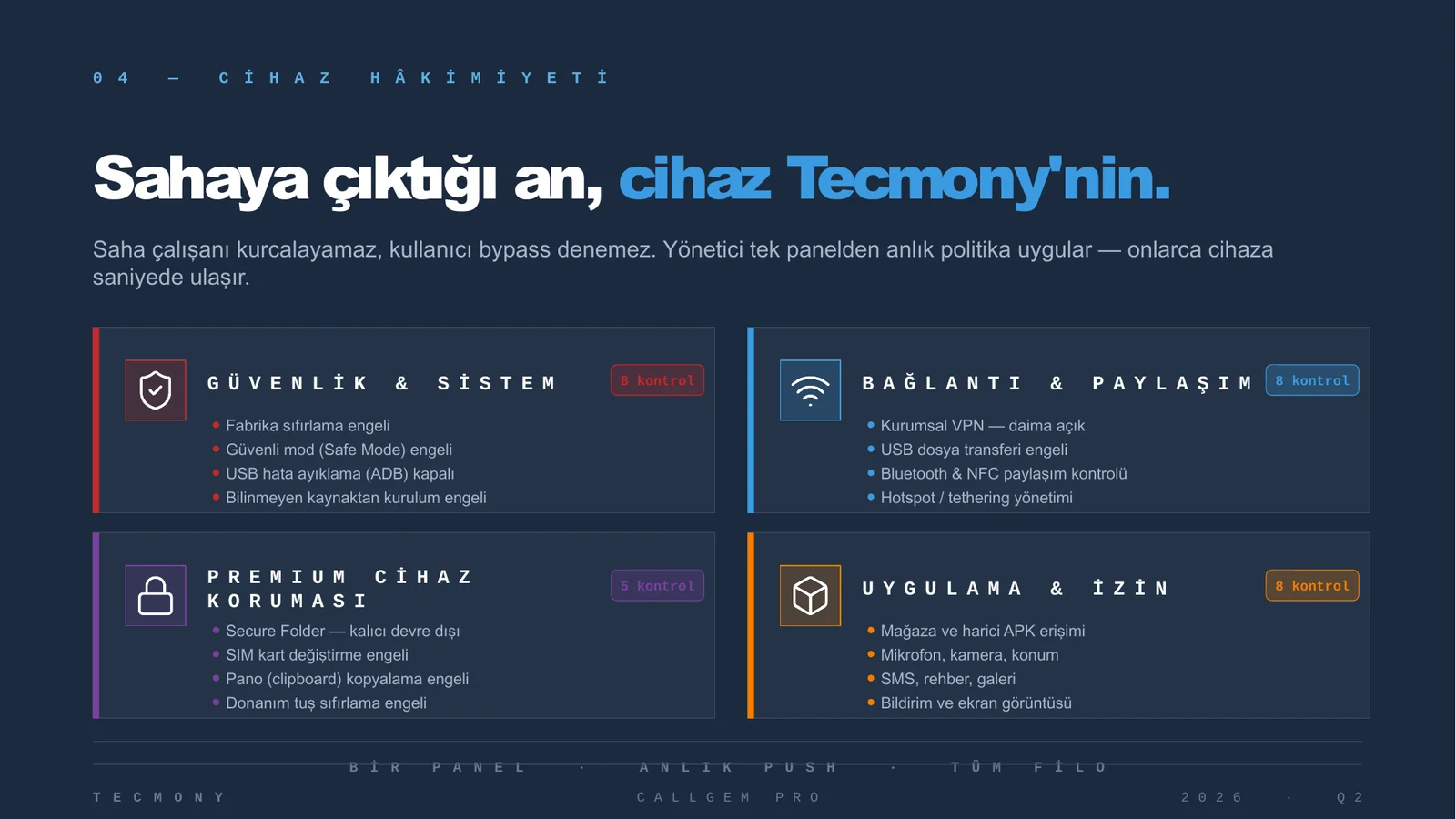
Write a policy template, assign it to a group, roll back with version history
The MDM screen manages device inventory, app distribution and restriction policies. When a template changes, the new version is pushed to the group; if something breaks, the previous version is restored.
- Live state: connection, battery, temperature and location
- Remote commands: lock, wipe, reboot, screen view
On the phone
The employee always sees that recording is on
The Android app runs in the background and shows a persistent notification while recording. The installer picks the employee from the directory; the rest is assigned automatically.
Device management
Built-in MDM: the phone fleet is managed from the same panel
CallGem runs as Device Owner on Android. Policies apply without waiting for a Knox premium key or a separate MDM licence. Everything below is managed from the panel, per group, with version history.
| Area | What you can do |
|---|---|
| Inventory and monitoring | Make, model, IMEI and serial number; Android version and security patch level; battery, storage and thermal state; live connection status over MQTT; network test, diagnostics report and log collection from the device. |
| App management | Silent installation, Play Store and enterprise APK distribution, allowed / blocked app lists, hiding apps not on the list, granting permissions centrally, retrying failed installs, blocking uninstall by the user. |
| Policies and restrictions | Blocking camera, screenshots, factory reset, USB debugging, unknown sources, safe mode, airplane mode, hotspot / Bluetooth / NFC, date-time changes and user creation; screen lock timeout; OS update policy; templates with version history and rollback. |
| Network and connectivity | Central Wi-Fi profiles, VPN configuration including always-on, corporate email (Exchange ActiveSync) setup, DNS redirection. |
| Security and remote action | Remote lock, wipe and reboot; live location and route history; remote screen view; file classification and quarantine (DLP); corporate data vault; remote shell; emergency reset procedure. |
| Release rollout | App updates go to pilot devices first, then to the fleet. The mechanism itself prevents a faulty build from reaching every device; a rollout can be paused and rolled back. |
How it works
Five steps from phone to panel
The whole chain stays within the organisation’s network boundary and within Türkiye. No audio file leaves the country.
- Recording starts on the deviceThe app detects the call and records one or two channels according to the recording policy. The employee sees a persistent notification.
- Chunked, encrypted uploadThe recording is uploaded over VPN and HTTPS to the organisation’s server in chunks and resumes after any interruption. The uploaded file is deleted from the device.
- Storage on the organisation’s serverAudio files and metadata are kept in object storage in the organisation’s own data centre. Retention is set by the organisation’s policy.
- TranscriptionTecmony’s GPU server in Türkiye transcribes the recording into Turkish; channel information becomes speaker labels. This server can also be placed in the organisation’s data centre.
- Analysis and panelSummary, sentiment and scoring are produced from the text; the call becomes searchable in the panel. Every access is written to the audit log.
Scale
Measured capacity
The figures below are not estimates; they come from deployment and measurement records.
5,000
devices: the fleet the server infrastructure is being prepared forSource: 21-server deployment preparation, August 2026
2,500
devices’ worth of audio processing on a single GPU serverSource: STT capacity measurement, August 2026
2,791
calls transcribed in one hourSource: same measurement, one server
2,728
automated tests on every release, 99.8% passingSource: test results report, August 2026
The architecture scales horizontally. VPN is planned as five nodes with roughly 1,000 devices each; if one node fails, the load spreads over the others. Larger fleets add servers with no change to the app. Deployment uses the existing phone inventory: devices are enrolled by QR code, Samsung Knox Mobile Enrollment or USB; field teams get a quick setup screen and an installation guide published at the organisation’s own address.
AI governance
Decision support, not decisions
The AI components in CallGem are speech recognition and call analysis. They produce scores, summaries and labels; they do not make autonomous decisions about staff.
In quality assessment the final judgement belongs to a person. Suspect transcript output (sentences the model invented) is filtered automatically and the recording is marked empty. Tecmony’s AI management system is certified to ISO 42001:2024 (DSR, certificate AIMS-26.08.206), and CallGem Pro is the product within its scope. The framework is published on the AI Management System Policy page.
Included in the installation
- Android app and web panel
- Transcription and call analysis
- Built-in MDM with policy templates
- REST API and Swagger documentation
- Installation guide, quick setup screen, support under SLA
Out of scope
- iOS and Windows device management
- Entra ID conditional access, SCEP / PKCS certificate distribution
- Microsoft 365 app protection policies
- Transcription in languages other than Turkish
- Two-channel recording on devices without Samsung Knox
A device cannot have two Device Owners: if your current MDM keeps ownership, CallGem runs as a managed app and two-channel recording requires a Knox allowlist. Android 10 or later is required; the target device model is tested before rollout.
Works with
Related products
CallGem runs on top of your call infrastructure; it is deployed alongside the following.
VoIP Router
Terminates your numbers in the carrier’s data centre and delivers calls to the PBX of your choice.
WAGEM
Collects WhatsApp conversations on corporate lines in a read-only archive; CallGem’s counterpart for messaging.
Dr. Call
Emergency communication platform that reaches all staff at once in a crisis.
Frequently asked
Questions asked before deciding
For a question not covered here, write to us; we will add the answer.
Where are the recordings stored? Do they leave the country?
Recordings are stored on the organisation’s own server. The transcription model runs on Tecmony’s GPU server in Türkiye; no audio file is sent to a cloud service. The analysis layer works on text, not audio. Tecmony does not routinely access production data.
Is consent from the employee and the other party required?
The organisation decides as data controller; CallGem provides the mechanism. Three options are ready: the other party is never recorded (our recommendation), recording only for numbers on a consent list, or a spoken notice at the start with one-sided recording if the person objects. A notice and consent template for employees is supplied with the installation.
How many devices does it scale to?
Server infrastructure for a 5,000-device deployment is being prepared today. A single GPU server handles the audio of about 2,500 devices; on the VPN side each node is planned for about 1,000 devices. Larger fleets add servers with no change to the app.
How much storage do we need?
In one measured example 44 devices accumulated 318 GB of audio; the one-year estimate for 5,000 devices is around 55 TB. The exact figure depends on call volume and retention period. Storage can be tiered: recent recordings on fast disk, older ones on cheaper disk, with no change to panel access.
Does recording stop if the employee closes or deletes the app?
No. Device Owner and Samsung Knox capabilities prevent the app from being uninstalled, stopped or stripped of its permissions. If the network drops, the recording waits on the device and uploads when the connection returns.
We already use Intune or another MDM. Will it conflict?
There are two scenarios. If the existing MDM keeps device ownership, CallGem runs as a managed app and two-channel recording needs a Knox allowlist. If CallGem becomes Device Owner, there is no wait for a Knox premium key; the device is factory reset and enrolled by QR. Which is right for you is decided before installation.
Does it run in the cloud or on our own servers?
Enterprise deployment is on-premise: web, worker, database, queue and object storage run in Docker on the organisation’s virtualisation platform. Tecmony also operates an evaluation environment where a handful of devices can be trialled before purchase.
How long does installation take?
Once the server infrastructure is ready, the platform is installed with Docker; in a 21-server environment, access verification and base preparation were completed within the same week. The device side is handed to the field team with the quick setup screen. What sets the timeline is fleet size and the organisation’s network preparation (VPN nodes, public IP addresses, port forwarding).
See it on your own devices
Start with a few phones in the evaluation environment and try the recording, transcript and panel flow with your own calls. Then we draw up your recording policy and server plan together.
Or reach us directly: +90 (216) 912 00 79[email protected]